1. What is StepStack?
Do you struggle with habits like walking, taking medication, or studying English—knowing you should do them, but often finding yourself making excuses? I built this app for myself because I’m one of those people too!
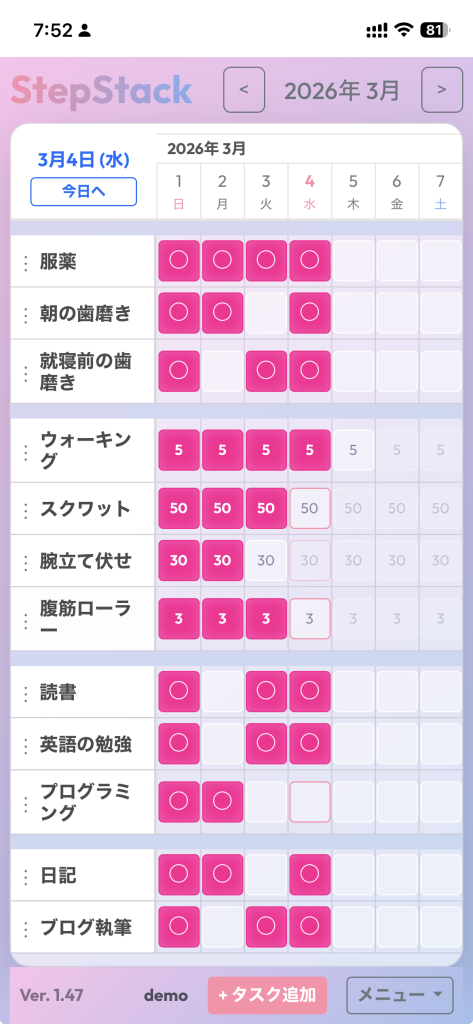
StepStack is a web-based task management and habit-tracking tool designed to visualize your daily efforts and turn consistency into motivation.
It features a “Horizontal Scroll Calendar UI” that lets you see your progress at a glance, with a design focused on the continuity from the past to the present and into the future.
Plus, the moment you complete a task, a rich confetti animation fills the screen! We celebrate your small daily steps with a maximum sense of accomplishment.
2. User Manual (Basic Usage)
Here is a guide on how to use StepStack. With its intuitive UI, anyone can start tracking immediately.
Access and Installation
- As it is a web app, simply access
https://bpucservice.com/StepStack?lang=en
in your browser. - While the app is open, use “Add to Home Screen” (on mobile) or create a shortcut to ensure easy access next time.
- On your first visit, a login screen will appear. Please try it out by logging in with the “demo” account.
📝 Account Creation and Login
- Create an account via “Sign Up” on the login screen.
- Log in with your registered information. Thanks to the secure “Remember Me” feature, you can access the app smoothly even after closing your browser.
➕ Adding Tasks
Set your daily goals using the “+ Add Task” button at the bottom right.
You can choose from four task types to suit your specific habits.
- Cumulative Type: For goals like “50 push-ups” or “reading 30 pages.” Ideal for tracking total daily achievements without skipping a beat.
- Discrete Type: For recording entries only on specific or preferred days.
- Checklist (Yes/No) Type: For simple habits like “taking supplements” or “taking out the trash” where you just need to record if it’s done or not.
- Section (Divider): A line to group and organize your tasks as your list grows.
You can also register start dates, target values (daily amount and units), and memos for reminders.
🎯 How to Log Your Progress
Logging your daily progress is incredibly simple.
- Just click or tap the calendar cell for the corresponding date!
- Once you reach your goal, the cell colors in, and a vibrant confetti animation bursts to celebrate! This feedback feels great!
*If you make a mistake, simply click the cell again to undo or delete the entry.
🔄 Sorting and Organizing Tasks
- Click the three-dot icon to the left of the task name and select “Sort.”
- Intuitive Sorting: Simply grab the “≡” icon in the task area and drag and drop to reorder them as you like. This is fully compatible with mobile touch controls.
- Editing Tasks: Click on a task name to view details, update target values, or edit the task itself.
📆 Navigation (Horizontal Scrolling)
- The central calendar area supports horizontal scrolling.
- Swipe left/right on mobile, or use your trackpad/scroll wheel on PC to seamlessly move between past reflections and future dates. Use the “<” and “>” buttons at the top for quick month-to-month switching.
We hope StepStack helps you build better habits and achieve your daily goals!


コメント